# Delete Cached Data
Source: https://apicaching.mintlify.app/api-reference/endpoint/delete
DELETE /
# Cache GET Requests
Source: https://apicaching.mintlify.app/api-reference/endpoint/get
GET /
# Cache POST Requests
Source: https://apicaching.mintlify.app/api-reference/endpoint/post
POST /
# Introduction
Source: https://apicaching.mintlify.app/docs
Set up your project to start caching your API in under 2 minutes.
## Create an API key
1. Log in to the dashboard and you should see the Projects module.
2. Click the Create new project button.
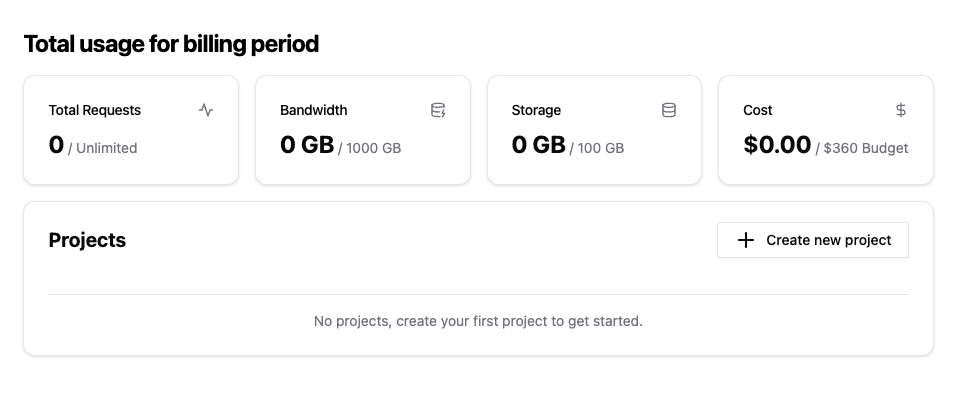
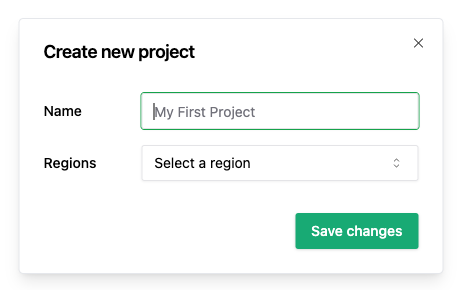
3. Select your primary region. You can add read replicas in other regions after.
4. Once you've created your project, it should show on the dashboard. Just click "View".
# Quick Start
Source: https://apicaching.mintlify.app/quickstart
Learn how cache your api with ease
**Prerequisite** You should have installed Node.js (version 18.10.0 or
higher).
```javascript javascript theme={null}
const headers = {
"Content-Type": "application/json",
"Accept": "application/json",
"X-ApiCaching-OriginUrl": YOUR_API_URL,
"X-ApiCaching-ApiKey": "YOUR_API_KEY",
// Cache for 12 hours
"X-ApiCaching-MaxAge": 43200,
// SWR - It can serve stale data for up to 300 seconds, before fetching from the origin
"X-ApiCaching-Swr": 300
}
const payload = {
// Your payload data here
}
fetch("YOUR_APICACHING_ENDPOINT", {
method: "POST",
headers,
body: JSON.stringify(payload),
}
```
```python python theme={null}
import requests
import json
headers = {
"Content-Type": "application/json",
"Accept": "application/json",
"X-ApiCaching-OriginUrl": "YOUR_ORIGIN_API_URL",
"X-ApiCaching-ApiKey": "YOUR_API_KEY",
# Cache for 12 hours
"X-ApiCaching-MaxAge": "43200",
# SWR - It can serve stale data for up to 300 seconds, before fetching from the origin
"X-ApiCaching-Swr": "300"
}
payload = {
# Your payload data here
}
response = requests.post("YOUR_APICACHING_ENDPOINT", headers=headers, data=json.dumps(payload))
```
```ruby ruby theme={null}
require 'net/http'
require 'json'
require 'uri'
uri = URI("YOUR_APICACHING_ENDPOINT")
headers = {
"Content-Type" => "application/json",
"Accept" => "application/json",
"X-ApiCaching-OriginUrl" => "YOUR_ORIGIN_API_URL",
"X-ApiCaching-ApiKey" => "YOUR_API_KEY",
"X-ApiCaching-MaxAge" => "43200",
"X-ApiCaching-Swr" => "300"
}
payload = {
# Your payload data here
}
http = Net::HTTP.new(uri.host, uri.port)
http.use_ssl = true
request = Net::HTTP::Post.new(uri.path, headers)
request.body = payload.to_json
response = http.request(request)
```
```go go theme={null}
package main
import (
"bytes"
"encoding/json"
"fmt"
"net/http"
)
func main() {
url := "YOUR_APICACHING_ENDPOINT"
payload := map[string]interface{}{
// Your payload data here
}
payloadBytes, err := json.Marshal(payload)
if err != nil {
fmt.Println("Error marshalling payload:", err)
return
}
req, err := http.NewRequest("POST", url, bytes.NewBuffer(payloadBytes))
if err != nil {
fmt.Println("Error creating request:", err)
return
}
req.Header.Set("Content-Type", "application/json")
req.Header.Set("Accept", "application/json")
req.Header.Set("X-ApiCaching-OriginUrl", "YOUR_ORIGIN_API_URL")
req.Header.Set("X-ApiCaching-ApiKey", "YOUR_API_KEY")
req.Header.Set("X-ApiCaching-MaxAge", "43200")
req.Header.Set("X-ApiCaching-Swr", "300")
client := &http.Client{}
resp, err := client.Do(req)
if err != nil {
fmt.Println("Error sending request:", err)
return
}
defer resp.Body.Close()
var response map[string]interface{}
if err := json.NewDecoder(resp.Body).Decode(&response); err != nil {
fmt.Println("Error decoding response:", err)
return
}
}
```
# Server Details Tab
Source: https://apicaching.mintlify.app/servertab
Here you will find details on how to access our caching server
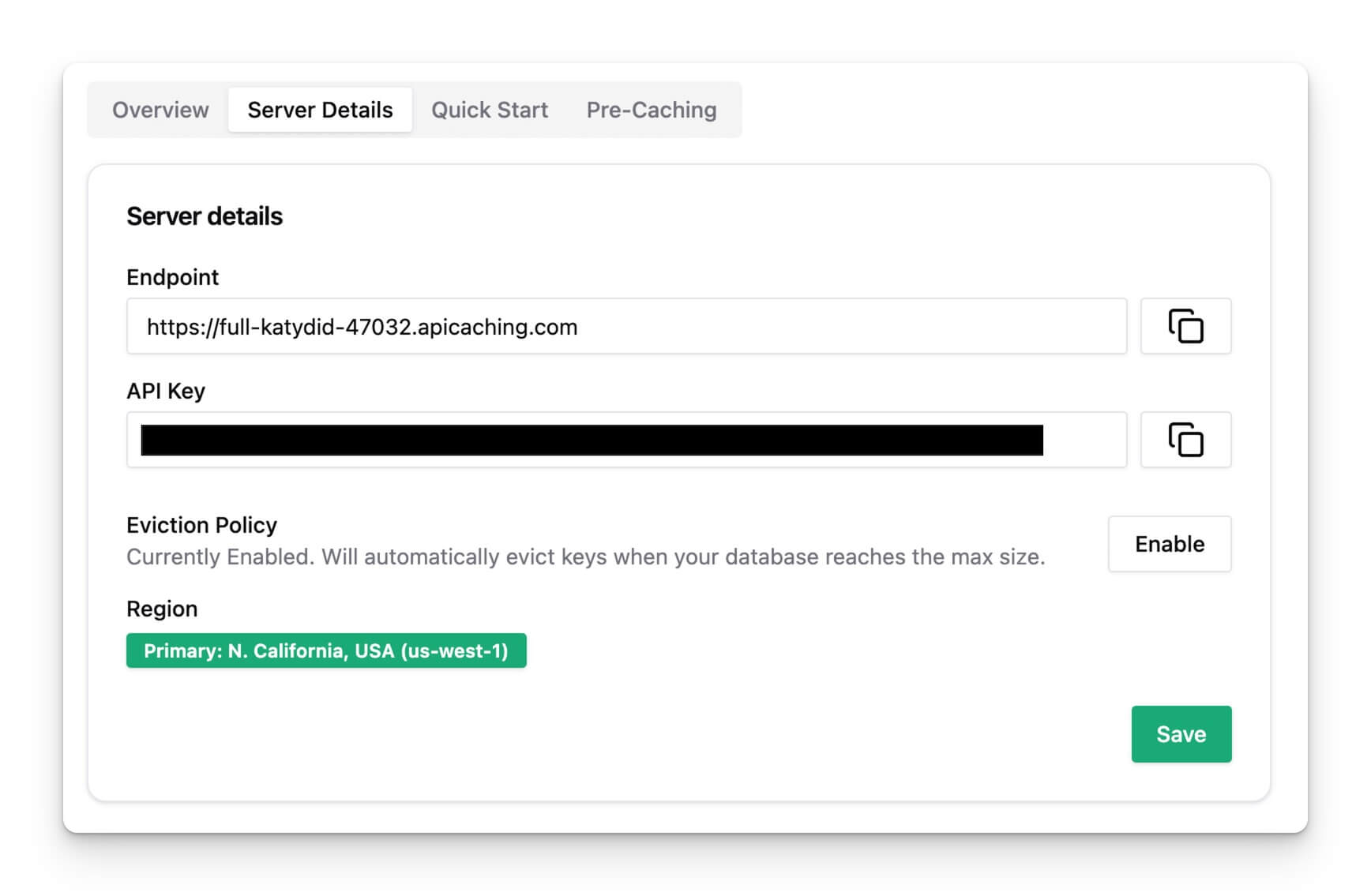
* Endpoint: Your unique endpoint URL that will cache all of your API responses
* API Key: Your API Key
* Eviction Policy: If enabled, the cache will automatically evict keys when your database reaches the max size.
* Region: The region your cached data is stored.